Getting started with AI agents from scratch: installing, understanding GitHub, and running your first tool
This is an article that I’ll keep updating. ...

This is an article that I’ll keep updating. ...

Why “too many notes” and “no notes” are the same thing Let me start with a rule I decided on early and haven’t changed since: in my note vault, there can only be one note per topic. It’s not about being a neat freak. It’s because if the same thing is covered in five different places, I have to open five files when I look something up, and figure out which version actually counts. That organization work didn’t disappear, it was just left intact for my future self. And my future self is usually seeing patients in clinic or rushing to finish slides, with no time to do this. The chaos caused by too much information is the exact same pain as not having enough information. ...

I was recently preparing an introductory AI lecture for our therapist colleagues, and thought I’d put together an advanced list of all the tools I normally use and the programs I’ve written. This way, when you want to do something, you can quickly look up “who to go to for this function.” It’s also something I’ve always wanted to organize for myself, so I’m taking this chance to write it all out. ...

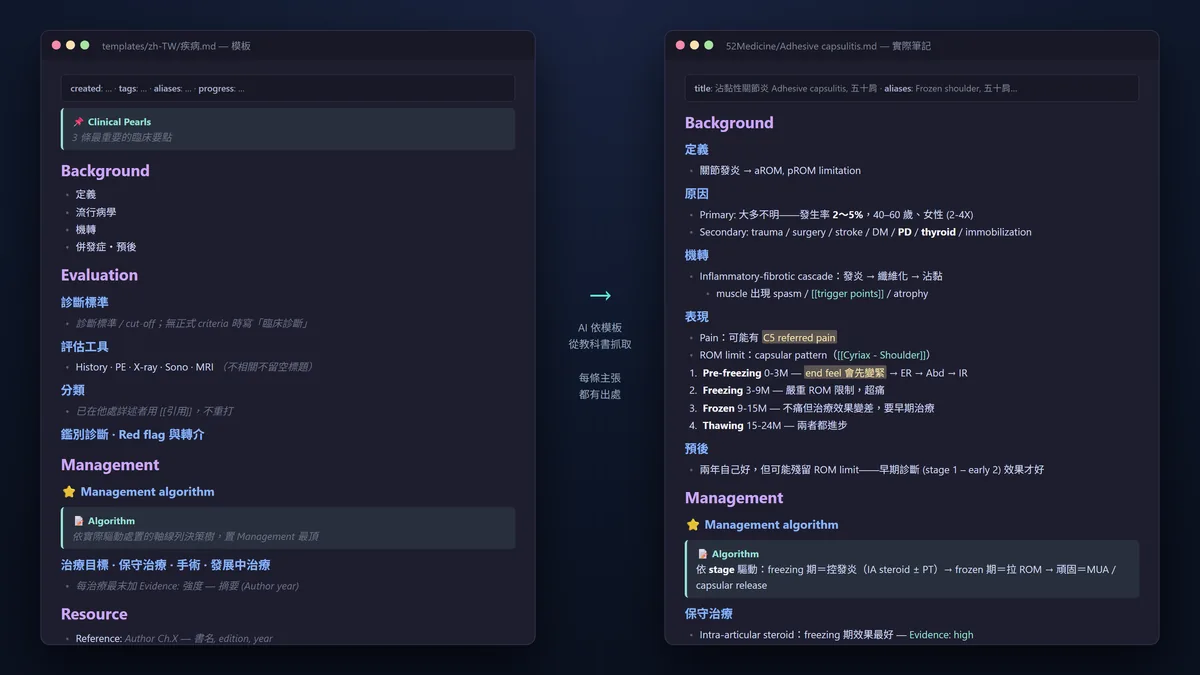
Origin I’ve loved taking notes since medical school and have accumulated thousands of medical notes over the years. But honestly, with information so easy to get and so much to learn now, it’s become hard to keep every note at the same quality using my own structure. On the other hand, in an era of ever-increasing information, trustworthy, high-quality sources have ironically become precious, which makes textbooks a great source of information. However, there are over forty designated reference books for the physical medicine and rehabilitation (PM&R) board examination, and the same concept might be scattered across different chapters in several books. Actually reading through all of them is almost impossible. ...

When I shared my critical appraisal tool a while ago (to have Claude help with critical appraisal and summarizing content), a friend gave me a very honest reply: the tool is nice, but having to dig up the PDF yourself every single time is actually the most annoying part. It really is. To let AI read papers for you, you first need the full text. And when it comes to getting the full text, what usually gets you stuck isn’t the AI—it’s permissions, publishers, and the library. ...

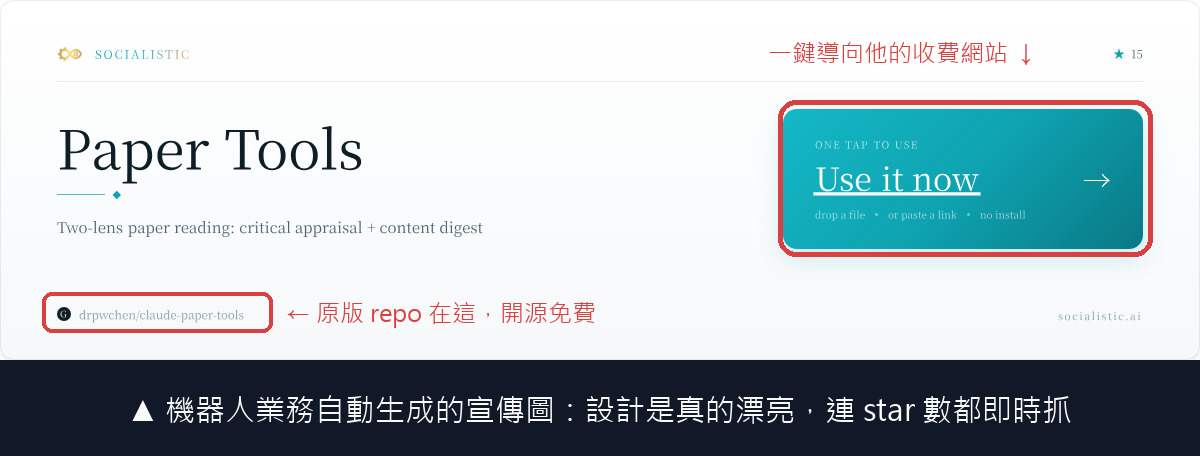
The paper tool paper-review-and-digest I shared earlier had only been open-sourced for a few days when it received its first GitHub issue! I was actually quite happy to get my first issue, and I was even more surprised when I opened it: they didn’t just read my code, but accurately pointed out the parts of the design I was most proud of. He said he appreciated the “hard split between the model and deterministic checks”: grade_judge.py doesn’t trust the level of evidence reported by the model itself, but recalculates it from the downgrade items; argdown_lint.py catches argumentative leaps like “jumping from surrogate endpoints to hard endpoints.” Then he said he built an online portal for me, so visitors don’t need to install Claude Code and can just upload a PDF to run the critical appraisal workflow. He even made a promotional image: ...

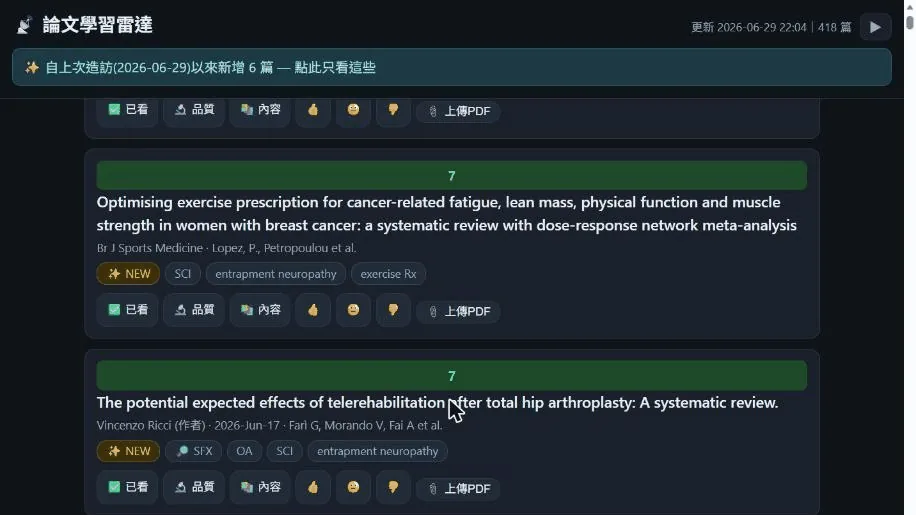
The paper learning station I shared earlier had “Quality” and “Content” buttons, but I didn’t release the backend implementation back then. It was basically a platform with a frontend web page, but you still had to organize the backend yourself. But for my own setup, of course the backend still had to be wired to AI to reduce the cognitive load. So here I’m sharing those two backend skills to help speed up everyone’s learning! ...

While prepping for the PM&R board examination, I used an engineer’s approach to solve an old problem for myself: how exactly should I practice past exam questions so I don’t forget them right after? I ended up building a small tool called “Exam Navigator,” and figured I’d tidy it up and open it up to share with anyone who needs it. 🔗 Live Demo (built-in demo account, ready to play): https://exam-demo.drpwchen.com 🔗 Source code: https://github.com/drpwchen/exam-practice ...

A while back, I shared the paper reading site I built for myself, and I got quite a few messages asking, “Can I use this too?” and “How exactly does it work?” I’ll explain it clearly in this post, and while I’m at it, I’ll let you know that I’ve organized it into an open-source version and put it on GitHub. First, the problem I wanted to solve. As a physiatrist, there are dozens of journals I want to track, along with a few authors I really want to follow and a couple of topics I’m always keeping an eye on. The traditional approach is to dump a bunch of RSS subscriptions into a reader or a notes app. As a result, hundreds of papers pile up every day, and it quickly turns into a garbage dump of “I’ll never finish reading this, and I don’t even know where to start.” In the end, you either get anxious or just give up reading altogether. ...

A minor annoyance that bothered me for a long time I’m a heavy Obsidian user, with thousands of notes sitting in my vault. But there’s one really inconvenient thing: Obsidian’s built-in search only looks for the exact words you type. The problem is, how would I remember what words I used back then for a note written three years ago? I’m thinking “how to manage a flaccid bladder,” but the note says Neurogenic Bladder → flaccid type → intermittent catheterization. The words don’t match, so the search returns a blank page. The worst part is, there were several times when I thought I hadn’t written about it, so I rewrote the whole thing, only to find out later that a more complete version had been lying there all along 😅 ...