Origin
I’ve loved taking notes since medical school and have accumulated thousands of medical notes over the years. But honestly, with information so easy to get and so much to learn now, it’s become hard to keep every note at the same quality using my own structure.
On the other hand, in an era of ever-increasing information, trustworthy, high-quality sources have ironically become precious, which makes textbooks a great source of information. However, there are over forty designated reference books for the physical medicine and rehabilitation (PM&R) board examination, and the same concept might be scattered across different chapters in several books. Actually reading through all of them is almost impossible.
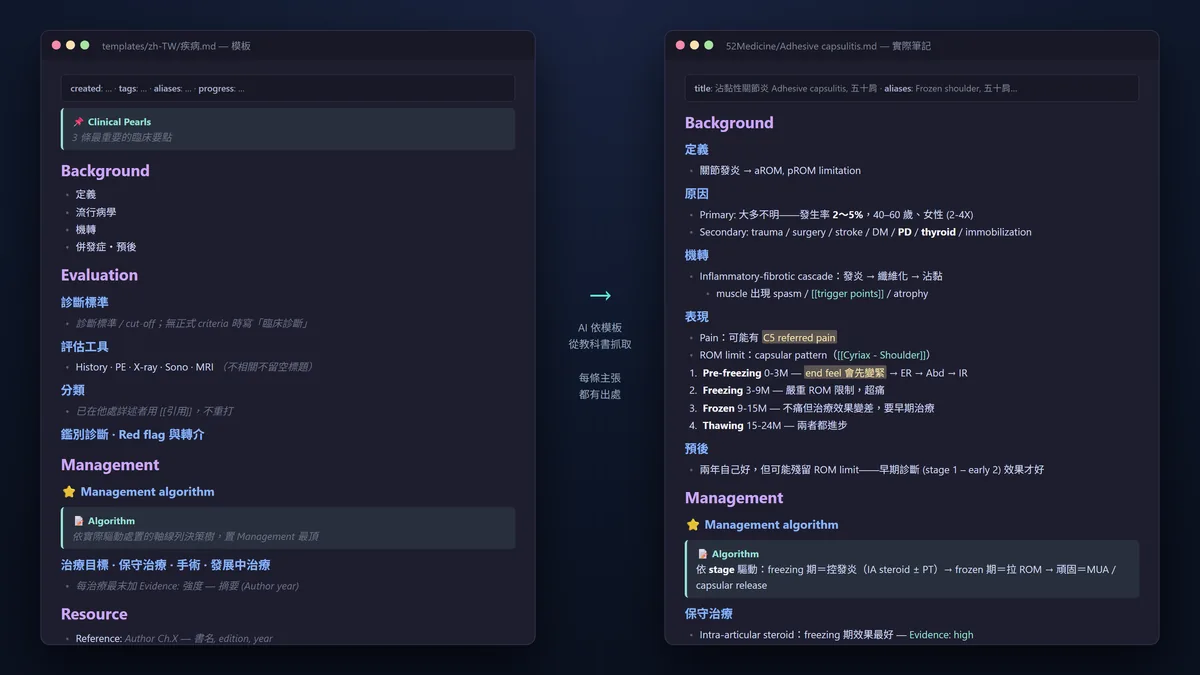
Luckily we have AI these days. Large language models (LLMs) excel at this kind of long-context processing, but tossing hundreds of textbooks at them all at once is still unrealistic. That’s when I paired good content search with database management, and clearly explained my note-taking workflow and tuned the AI to it. Avoiding hallucinations, this ensures the AI generates notes structurally and with evidence, so I only need to focus on absorbing the compiled, high-density information into my brain.
So this turned into a massive textbook LLM Wiki project: converting books into AI-readable formats, accurately locating target chapters, organizing and presenting them by my structure, pulling important images from textbooks into the notes, and finally integrating them with existing notes.
I open-sourced it today, and this post covers the hurdles I cleared along the way.
Hurdle 1: Converting books into AI-readable formats
Throwing PDFs directly at a large model has a few pitfalls: it’s slow and expensive (reading a thousand-page book page by page has a hefty token cost); it will casually skip over scanned pages or pages with broken font encoding, and you won’t even realize your notes are missing things; and images just disappear.
My solution was to keep all the heavy lifting on my local machine: text extraction uses PyMuPDF, about 0.13 seconds per page, 0 tokens. Scanned pages run through a local OCR pipeline (Surya → PaddleOCR-VL → local vision model), and only if all those fail does the large model step in itself. Two details are particularly unique:
- Silent failure detection: Using rules like font risk and character density to catch pages that “look like text was extracted, but are actually gibberish.”
- Double-column sorting: Textbooks are often in a double-column layout. Direct extraction tangles sentences from the left and right columns together, and gibberish detection won’t catch this. We implemented column detection to ensure correct reading order.
Hurdle 2: Chopping books into searchable units
The books are converted, but how does the AI find the content? Traditional indexes aren’t enough, because a topic is often scattered across several chapters; adding tags manually isn’t practical either, as it’s impossible to maintain and doesn’t slice things finely enough. The answer is semantic embedding: converting content into vectors, searching by meaning instead of keywords.
There’s an easily overlooked design choice here: chunking isn’t a mindless fixed word count. Cut too small and you lose context; cut too large and you dilute the semantics. We chose to chunk according to heading structure, preserving the upper-level chapter context for each chunk, so every piece pulled back by the search is a complete concept with a beginning and an end.
Hurdle 3: Finding the right book among dozens
The foundation of cross-book searching is the vault-search method I open-sourced previously (the introduction to that post is here), using local LanceDB plus bge-m3 embeddings, so data never leaves your computer.
On top of this, we added another layer: weighting for key bibliographies. Designated books for the board examination and official society textbooks get higher scores during searches, and there’s also weighting based on publication year. For the same topic, the AI will prioritize citing your most trusted sources.
Hurdle 4: Establishing the note-writing algorithm and principles
The tools are there, but what really determines note quality is the workflow design:
- Draft blind first: The AI doesn’t look at my existing notes initially, independently pulling complete data from textbooks to write a draft, and only merging at the end. This prevents interference from the structure and content of old notes.
- Templates drive the extraction: Every topic type has a fixed template. This design is crucial; the AI knows what to look for in the books, and I know what sections to expect every time I read, making absorption much faster. I included the five bilingual (Chinese/English) templates I use daily directly in the repo, so you can adapt them for yourself.
- Sections designed for understanding: Like the Summary at the start and the management algorithm at the end. Their existence itself aids understanding; they aren’t just data dumps.
- No citation, no dice: Every claim is cited down to the book title and chapter. Anything the AI fills in with its own knowledge is strictly labeled as an inference.
Hurdle 5: Extracting images from books
This is the hardest part of the entire system because every book has a different layout logic. Our approach was to start with a universal method (geometric matching: captions and the nearest images claiming each other), paired with a deterministic audit: whitespace checks, text bleed checks. It only passes if it clears the rules—the AI’s word isn’t final—and it runs completely locally in a token-saving way.
When we hit an extraction error on a specific book, we fix the extraction logic for that book, and it won’t mess up on that book again. This setup has evolved through many versions, but honestly, it’s still experimental. I wouldn’t dare say it applies to all books yet, and everyone is very welcome to help improve it!
Bonus: Plugging in external evidence sources
In my own version, the note-taking workflow can connect further outward: like plugging into OpenEvidence for clinical evidence supplements, or querying the National Health Insurance Research Database (NHIRD) for reimbursement guidelines.
We spun off the OpenEvidence query-plus-verify component and open-sourced it as a separate little project, openevidence-tools.
A special thanks here to Dr. Lin htlin222. I originally wrote my own browser automation to connect to OE, but after getting blocked, I found his work. The key concepts that later made this verification system truly viable almost all came from his recent updates: OE’s origin field is obfuscated; once decoded, you can tell which database the content was pulled from, making it possible to predict the probability of a misplaced citation. Even the naming of the transitive citation failure mode (where a review cites someone else’s numbers, but OE credits the review) and the entire verification architecture were his doing. What we added was the half he hadn’t done—namely, what OE actually missed. The details are in the repo’s acknowledgments and NOTICE. Just a reminder: you absolutely must verify, because OE does make citation errors.
Other external sources are designed as pluggable extension stages in the workflow documentation, so anyone who needs them can connect data sources from their own fields. I previously baked this same “no bluffing from memory” principle into my paper reading toolkit, which you can read about here.
Usage: Toss the repo to your AI
The people who’d come use this system probably bring their own AI assistants anyway, so the repo includes an AGENTS.md file, which is deployment instructions written directly for the AI. To use it, just throw the repo at Claude Code (or any coding agent) and say:
“Read AGENTS.md and help me install it.”
The repo is here: github.com/drpwchen/textbook-to-note, under the MIT license. The tool itself does not include any book content, so please use legally acquired books (open-licensed OpenStax textbooks are great for testing).
Conclusion: Learning has never been this easy
After finishing this system, getting a fast, deep, textbook-level understanding of a specialized topic became something that happens at the push of a button.
I sometimes wonder what notes will look like in the future. Maybe they’ll lean more towards recording “that flash of inspiration when reading something,” rather than the grueling work of organizing and summarizing. Though to be honest, AI can already find connections in my knowledge map that I hadn’t thought of before 🤣
Learning has become easier than ever; even a few years ago, I wouldn’t have dared to imagine this kind of convenience. This system isn’t limited to physical medicine and rehabilitation (PM&R), and I think it isn’t even limited to medicine—I hope it helps everyone who needs to learn!
If you find a bug or have suggestions for improvement, you’re more than welcome to open an issue or PR to make this system better and better!
—