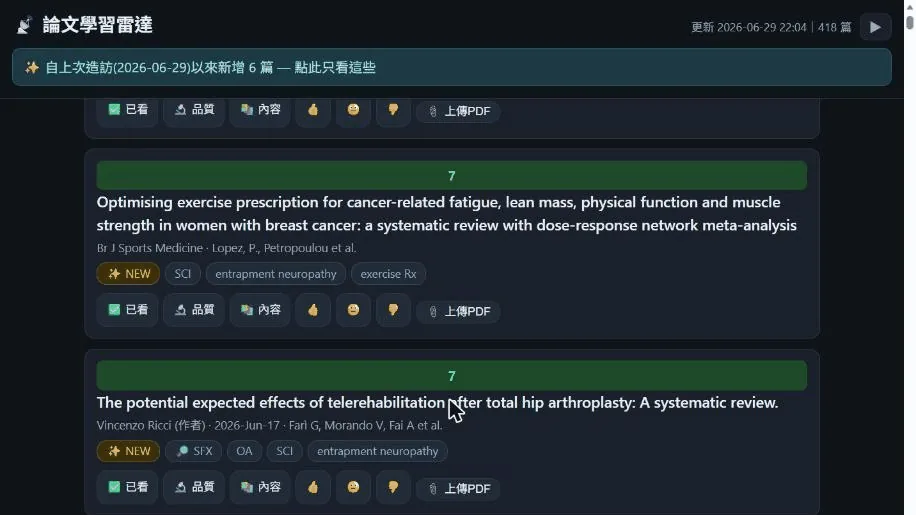
A while back, I shared the paper reading site I built for myself, and I got quite a few messages asking, “Can I use this too?” and “How exactly does it work?” I’ll explain it clearly in this post, and while I’m at it, I’ll let you know that I’ve organized it into an open-source version and put it on GitHub.
First, the problem I wanted to solve.
As a physiatrist, there are dozens of journals I want to track, along with a few authors I really want to follow and a couple of topics I’m always keeping an eye on. The traditional approach is to dump a bunch of RSS subscriptions into a reader or a notes app. As a result, hundreds of papers pile up every day, and it quickly turns into a garbage dump of “I’ll never finish reading this, and I don’t even know where to start.” In the end, you either get anxious or just give up reading altogether.
What I wanted wasn’t to “read more,” but a radar that would filter and rank for me first, letting me focus my attention only on the handful of papers I really should read. So, I built this site. It operates roughly in these layers.
1. Automated fetching: gathering dozens of sources into one stream
Every morning, the server automatically fetches dozens of sources: journal RSS feeds, plus “author tracking” and “topic tracking” using PubMed searches. Some journals have terrible RSS feeds or outright block bots, so I bypass them using PubMed queries instead. I can still grab them, and they come with DOIs, which makes downstream processing easier. After pulling everything in, it automatically deduplicates them into a clean list.
2. Interest scoring, and it gets to know me better over time
This is my favorite layer. Every paper gets scored by an “interest model,” bubbling the ones I’m most likely interested in to the top and sinking the noise to the bottom.
More importantly, it learns. When I’m scrolling on my phone, I give a thumbs-up to what I like and skip what I don’t. These reactions feed back into tweaking the model’s weights. The longer I use it, the better it understands my tastes, and the more accurate the sorting gets. This “you teach it, it rewards you” loop is what I think makes it smarter than plain RSS.
3. Full-text in three tiers: confirming “can I get it?” upfront
When you see something you want to read, the most annoying part is often “I found it, but I can’t open the full text.” So I have it automatically tag each paper’s acquisition difficulty upfront:
- 🟢 Open Access: Automatically downloads the PDF for me.
- 🏥 Institutional subscription: Automatically checks if my affiliated library subscribes to this journal and whether I can get this paper right now.
- 📎 Self-supplied: If it’s neither of the above, it provides a link for me to grab it myself, or lets me drop the PDF straight in.
This way, I know whether I can actually read each paper right as I scroll, without having to click into them one by one to test my luck.
4. A private site just for me
Key point
The whole site is locked down. Only I can get in; it’s not open to the public, and it doesn’t have my name on it. It’s my personal reading desk. Whether I open it on my phone or computer, it’s in the exact same state. What I checked off on the MRT yesterday, I can still see when I open it at the hospital today. The interface is just paper cards, carrying the badges mentioned above, plus a few action buttons.
5. Check the boxes, and it handles the rest
This is the closed loop that ties everything together. When I see something I like, I just check “digest content” or “critical appraisal.” With that simple signal, it automatically fetches the full text, digests the key points into notes, performs the critical appraisal, and finally files it into my own notes system. If I’m out and see a good paper someone shared, I can drop it right into this webpage, and it processes it for me just the same.
So my reading went from being “drowned in hundreds of papers” to “scrolling daily, checking a few boxes, and reading the digested highlights." The time and energy saved is far more than I imagined.
Open-sourcing it, and you’re welcome to build your own radar
I cleaned up my code and put it on GitHub, with instructions in both Chinese and English:
👉 https://github.com/drpwchen/paper-radar
It’s not just for medicine. Any source with RSS—papers, news, blogs—can be forked and adapted into a radar for your own field. If you want to self-host one, just follow the instructions.
A quick note: for the papers the radar picks out for me, the downstream work is handed off to two other tools responsible for “critical appraisal” and “digesting.” I later open-sourced those parts too, which I wrote about in this post. The radar handles the picking, the skill handles the reading, and connecting the two ends makes for a complete paper reading workflow.
Finally, on a personal note. I’ve had this idea in my head for a long time. Before I stepped into vibe coding, I saw Yi-Cheng Wu, MD (sports medicine, rehabilitation medicine) build a similar platform. I was envious and curious at the time, thinking, “I wish I had one of those.” I never expected that I’d actually be able to build it with my own hands now, let alone clean it up and share it with everyone.
Going from a thought of envying someone else, to building it myself, and then open-sourcing it for others to use—it’s a truly amazing feeling, and I’m very happy 😊
If you also often find yourself drowning in endless information, you’re welcome to check it out. Dropping a star ⭐ while you’re there would be a huge encouragement to me.
If this tool has saved you time, you’re also welcome to buy me a boba to keep the server spinning 🧡
—