When I shared my critical appraisal tool a while ago (to have Claude help with critical appraisal and summarizing content), a friend gave me a very honest reply: the tool is nice, but having to dig up the PDF yourself every single time is actually the most annoying part.
It really is. To let AI read papers for you, you first need the full text. And when it comes to getting the full text, what usually gets you stuck isn’t the AI—it’s permissions, publishers, and the library.
So the last piece of The Paper Trilogy, and the most painful one, is finally filled today: paper-fetch (open source under MIT). Give it a DOI, and it will walk the whole route itself to grab the full-text PDF.
| Stage | Tool | What it does |
|---|---|---|
| Discover | learning radar paper-radar | Feed new papers via RSS/PubMed, sort by interest |
| Download | paper-fetch | DOI → full-text PDF |
| Appraise | paper-review-and-digest | Critical appraisal, content summary |
—
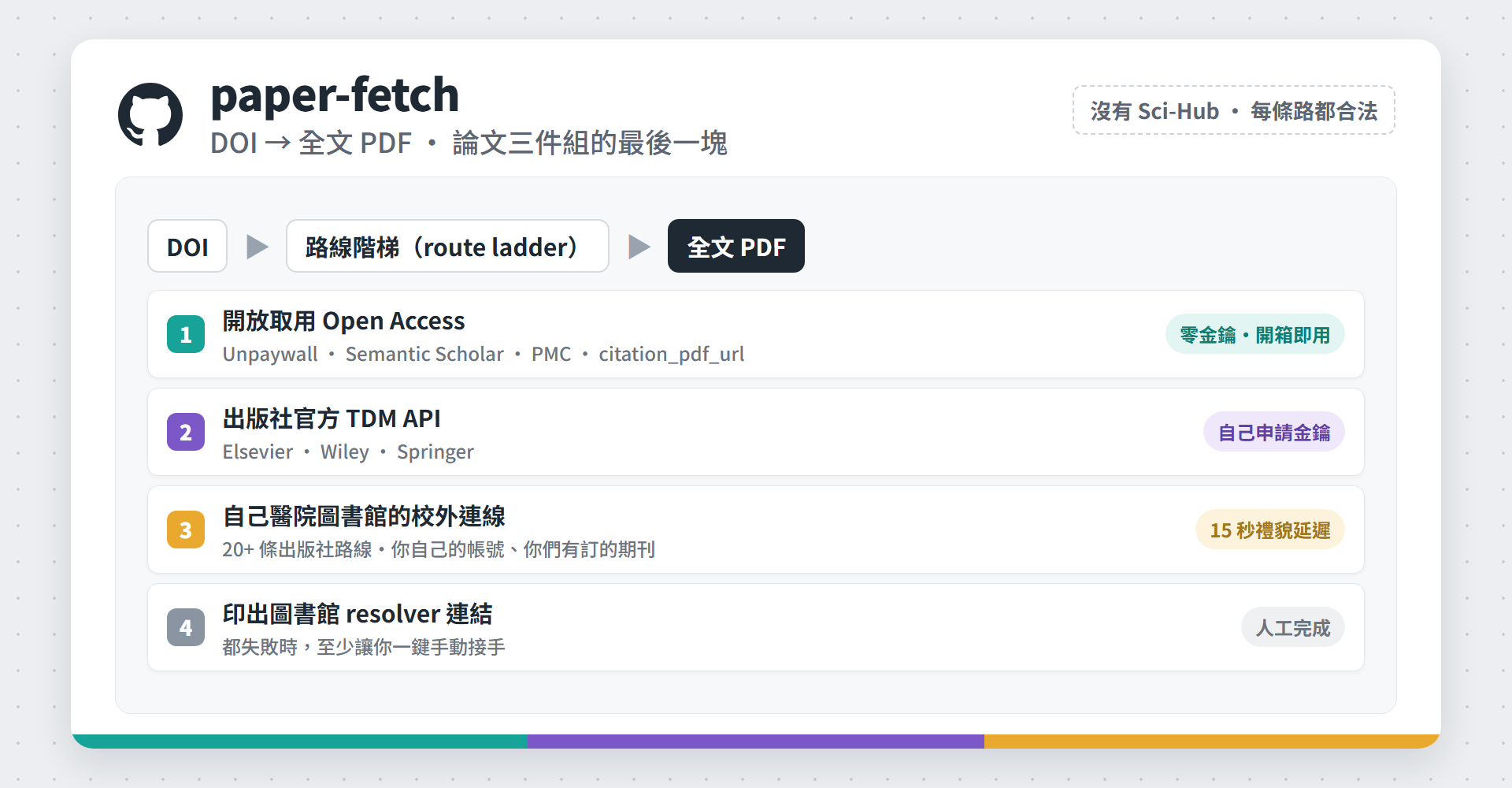
How does it work? A ladder from cheap to troublesome
The whole design comes down to one sentence: take the cheapest, most legitimate route first, and only drop down when it fails.
Tier 1: open access
Unpaywall, Semantic Scholar, PMC/Europe PMC, and the citation_pdf_url meta tag hidden in the article’s webpage (which is exactly what Google Scholar uses to index PDFs). This tier requires zero API keys and works out of the box; you just need to put your email in the config file. For those without library resources, I’ve hooked up every source I could.
Tier 2: Official publisher text-mining APIs
Elsevier, Wiley, and Springer all have APIs officially open for text mining. You just go apply for a key yourself; it’s a completely permitted channel. This tier has absolutely nothing to do with piracy—people just rarely know it exists.
Tier 3: Your own hospital library’s off-campus connection
Log in with your own account and grab the journals your hospital already subscribes to. It simply automates the string of clicks you’d normally do by hand, rather than bypassing paywalls.
Tier 4: Surrender, but surrender usefully
If everything fails, it will print out the library’s SFX/OpenURL link for you to click manually, instead of just throwing an error and calling it a day.
No Sci-Hub, no piracy routes. Every tier is a path you’re already entitled to walk.
—
What took the most time? Figuring out every publisher’s temper
This is what I feel is the most shareable part of the whole project. Turning a DOI into a PDF sounds like one line of code, but in reality, every publisher does it differently, and there’s no documentation to check. You just have to bash your head against it paper by paper. I’ve currently figured out and validated against real articles over 20 different routes, which converge into four shapes.
Shape 1: URL templates
The ones with rules to follow are the happiest; you just construct the PDF URL directly from the DOI. Wiley, Springer/BMC, NEJM, Sage, Taylor & Francis, AJR, Radiology, and World Scientific all fall into this category.
Shape 2: Reading citation_pdf_url
When you meet a new publisher, try this one first. Many websites don’t have rules for DOI-to-PDF, but they’ll honestly write a <meta name="citation_pdf_url"> right in the article page’s HTML, telling you directly where the PDF is (because this is how Google Scholar indexes them). Just resolve the DOI to the article page, read that meta tag, and fetch it with the Referer. Absolutely zero reverse engineering needed. This is how I got JAMA, Oxford, Nature, and Pediatrics.
Shape 3: “Headed” browsers required
It’s still reading the meta tag, but Cloudflare will block it. There’s something I misjudged here at first: I originally wrote in the documentation that BMJ was a “hard WAF block, dead end,” only to realize later that it only blocks headless browsers. I actually opened a browser with a visible screen, honestly navigated over, and it passed on the first try. AJNR and J Nucl Med were saved by this exact same trick.
A conclusion of certain death is worth re-verifying every once in a while.
Shape 4: Multi-step signed URLs
Platforms like LWW/Ovid won’t give you a fixed URL. PDF links are issued for one-time use, and you have to walk through a string of pages in order to get them. This type is the most annoying, but it’s still passable.
—
When it fails to fetch, whose fault is it really?
There’s another really punishing trap: an article you don’t subscribe to will make a perfectly good route return a page of HTML or a 403, which looks exactly like the code is broken. So you go running to fix something that isn’t broken at all.
So I added a holdings.py layer to the tool: it saves the library’s A–Z e-journal list (journal, platform, covered years) as a local lookup table. Then, for every paper, it uses the DOI to grab the ISSN and year from CrossRef, and one look tells you whether you actually have access to this paper. Confirm permissions first, then go back to judge whether the route is broken.
Two practical details:
- Coverage is journal-by-journal and year-by-year. The library might have only subscribed to a single issue of a journal in the 1990s, or it might not include online first, so “we subscribe to this one” isn’t nearly enough.
- “Not in the list” does not equal “no access.” JAMA isn’t in our e-journal list at all (it’s hung at the database layer), but a proxy test actually fetches it. So when there’s no data found, I just warn and try anyway.
Every library’s A–Z page looks different, so I didn’t include a scraper; I just provided the field specs for the data table. You can scrape it yourself, or just ask the library directly for an export file—either works.
—
To be honest, it’s not ready to use out of the box
I want to be clear about this, so people don’t clone it with expectations only to be disappointed:
- You have to put your own hospital library’s endpoints in the config (link resolver, off-campus authentication portal, proxy host). These aren’t secrets; they’re public information for your library.
- You have to apply for a few publisher API keys (free, but you have to fill out forms).
- I left the
login()in the library proxy tier blank. Because every hospital’s login flow is different (EZproxy, OpenAthens/Shibboleth, VPN, and self-built portals are the four major families), you really can only wire this part up yourself.
But this is exactly what makes this era fun
There’s an AGENTS.md in the repo, which is an instruction manual written specifically for AI to read: what this tool is, how to help the user deploy it, how to verify it post-deployment, and what the red lines are (no faking other institutions’ endpoints, no hardcoding credentials in configs, no removing rate limits for mass downloads, no adding Sci-Hub routes). The docstrings in the code are also written to “teach you the method” rather than just “make it run.”
So you don’t need to know how to code. Toss the repo to Claude and tell him, “help me hook this up to our hospital library,” and he’ll read AGENTS.md, ask you for endpoints, walk you through devtools to check the login flow, and fill out login(). That’s exactly how I wrote it with him myself.
—
A red line: don’t mass scrape in parallel
The library tier is strictly one by one, waiting 15 seconds between each paper.
Caution
This isn’t me being pedantic. Once publishers detect systematic mass downloads, they block the IP for the entire hospital, hurting all your colleagues in the whole hospital. The rate limiting in the tool is to protect this shared resource, so please don’t remove it.
—
To my colleagues at Hualien Tzu Chi Hospital
The Tzu Chi version (endpoints filled in, ready to run) is another private repo. If you want to try it out, DM me your GitHub email and I’ll add you.
From discovery, to download, to critical appraisal, this pipeline is finally cleared all the way through. If I’ve misunderstood anything here, corrections are always welcome~
—